Legacy Keeper’s Estate Planning Dashboard gives clients a secure, purpose-built estate planning platform. This platform goes far beyond generic cloud storage. The Estate Planning Dashboard meets every estate planning need directly. Clients get robust privacy protections and always retain access, even if their advisor’s subscription ends. The Estate Planning Dashboard combines asset growth projections, automated checklists, secure document storage, task management, and easy collaboration. In addition, advisors collect client data efficiently through Guided Forms. Clients trust that their sensitive information stays safe, protected by estate-specific privacy policies. Onboarding is simple. Clients log in, follow easy steps, and upload estate documents. As a result, planning is now accessible and stress-free.
What Is the Estate Planning Dashboard?
The Estate Planning Dashboard is a secure hub for estate planning. It is built for clients working with financial advisors. Unlike general cloud storage, the Estate Planning Dashboard solves estate planning needs directly. Clients securely store documents, track asset values, manage beneficiaries, and collaborate with family or advisors. Notably, Estate Planning Dashboard privacy policies, terms of service, and data deletion policy protect every detail. Therefore, clients get maximum protection and peace of mind.
Overview at a Glance
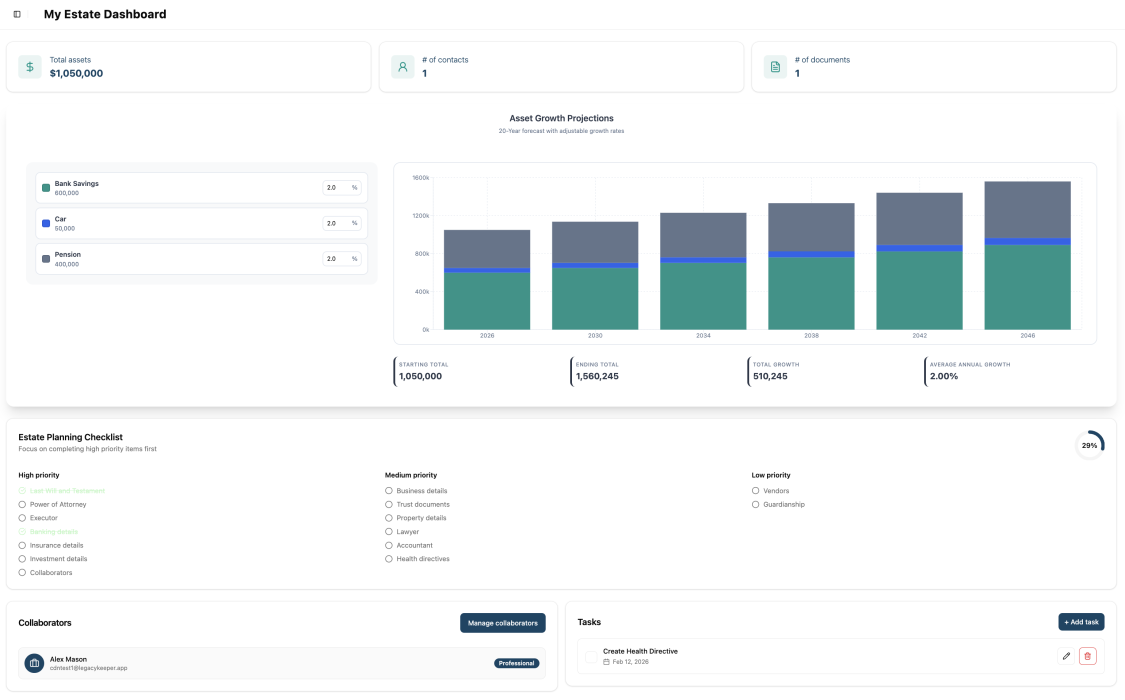
The Estate Planning Dashboard provides clients with a comprehensive overview of their estate. It highlights total asset value, number of contacts, and uploaded documents.
Asset Growth Projections
An interactive Asset Growth Projections chart reveals a 20-year forecast with adjustable growth rates for each asset category. This feature displays key figures, including starting and ending totals, total growth, and average annual growth.
Estate Planning Checklist
The Estate Planning Checklist prioritizes outstanding tasks and tracks their completion. As a result, nothing is overlooked, and clients move forward with confidence.
Collaboration and Task Management
The Collaborators section details who has access to the dashboard. In addition, the Tasks section empowers advisors to assign action items with due dates, keeping everyone aligned and informed.
The Estate Planning Dashboard puts clients in control of their data. If a financial advisor stops using Legacy Keeper, clients keep full, independent access through personal logins. Clients own their data and always have access. In fact, Legacy Keeper sets a new standard for client empowerment and trust.
The Problem This Feature Solves
Families face significant risks when they store estate data and planning documents on generic platforms such as Google Drive or Dropbox. These tools do not protect sensitive legal documents. They lack estate-specific privacy safeguards. Consequently, families risk losing control and exposing their legacy information when using general-purpose cloud storage.
Financial advisors waste time on fragmented, inefficient data collection. Clients must find documents from many sources, fill out forms, and attend extra meetings. Advisors chase missing details like purchase prices or beneficiary designations because there is no central system. If firms change, estate data gets lost or scattered. Therefore, the process becomes harder for everyone.
How the Feature Solves These Challenges
Legacy Keeper’s Estate Planning Dashboard solves these problems with three main features. As a result, clients and advisors benefit from a more efficient, secure process:
Purpose-Built Privacy and Data Ownership
Legacy Keeper’s privacy policies are designed specifically for estate planning data. We never use client information for any purpose outside of financial planning within our system. Legacy Keeper also employs advanced security measures, including encryption and password-free authentication, to protect client information. In addition, clients retain permanent ownership of their data and retain full access even if their advisor’s subscription ends.
Guided Forms for Structured Data Collection
Our 22-step process guides clients through each part of their estate, including personal information, document uploads, relationship details, asset inventory, trust structures, beneficiary designations, retirement accounts, and personal care preferences. In addition, AI-powered document scanning extracts data automatically, reducing manual entry and helping ensure completeness.
Centralized Estate Intelligence
The Estate Planning Dashboard consolidates estate planning details into a single, clear view. Clients see asset growth over 20 years, use automated checklists to cover every detail, and manage tasks with their advisors and family. As a result, everyone stays aligned and accountable.
How to Use the Estate Planning Dashboard
Getting started with the Estate Planning Dashboard involves these straightforward steps. Most clients complete setup in under an hour, ensuring a stress-free, efficient process.
- Complete the Getting Started Introduction: Begin with the platform overview that orients you to the Guided Forms process and explains what information you’ll need to gather.
- Enter Personal Information: Provide your name, address, and contact details. This establishes your profile as the principal of the estate plan.
- Upload Key Documents: Upload your Last Will & Testament, Power of Attorney, insurance policies, property tax assessments, bank statements, and investment account statements. Legacy Keeper’s AI extracts data automatically from each document, populating your estate profile without manual entry.
- Add Relationships and Family Details: Enter your relationship status, spouse or partner information, children, and estate role holders such as executors, powers of attorney, trustees, and guardians.
- Record Assets and Holdings: Add real estate properties, insurance policies, private company or corporate shares, trust details, beneficiary designations, retirement savings accounts, additional assets like precious metals or heirlooms, and vehicles.
- Complete Personal Care Preferences: Document funeral arrangement preferences, personal caComplete Personal Care Preferences: Record your funeral arrangement preferences, personal care directives in case of incapacity, and quality of life expectations.ts into journal entries for easy reference and sharing with family members and collaborators.
- Review Your Dashboard: The Estate Planning Dashboard lets clients track asset growth, monitor checklists, and work with advisors on tasks. Data ownership and Guided Forms make document collection easy and fast. Estate planning that once took weeks now takes just one afternoon. Clients always have access to their data, no matter their advisor’s status. Support is always available by live chat, phone, or email.
Frequently Asked Questions
Q: Is my data truly safe?
A: Legacy Keeper’s privacy policies are written exclusively for estate planning data. Your information is securely contained on Legacy Keeper’s AWS infrastructure and is not used for any purpose outside of your estate planning needs. The platform adheres to the General Data Protection Regulation (GDPR) and the California Consumer Privacy Act (CCPA), offering you a secure legal framework. Unlike general-purpose cloud services, which permit broad data usage beyond document storage, Legacy Keeper is designed for privacy.
Q: What happens to my data if my financial advisor cancels their Legacy Keeper subscription?
A: Your data remains fully accessible. Legacy Keeper guarantees that clients retain access to all their documents, contacts, asset details, and estate-planning information, regardless of their advisor’s subscription status. This is a key differentiator from other estate planning platforms.
Q: How is Legacy Keeper different from storing my documents in Google Drive or Dropbox?
A: General-purpose cloud services have privacy policies that allow broad data usage beyond document storage. Legacy Keeper’s privacy policies are written exclusively for estate planning data—your information is never used for any purpose outside of your financial planning needs. The platform is also specifically designed for estate workflows, with features such as AI document extraction, structured checklists, and beneficiary tracking that general storage services simply don’t offer.
Q: What documents can I upload through the Guided Forms?
A: The Guided Forms support uploads for Last Will & Testament, Power of Attorney, insurance policies, property tax assessments, bank statements, and investment account statements. Each uploaded document is scanned by AI to automatically extract relevant data, including contacts, asset values, beneficiary designations, and ownership details.
Q: How does the Asset Growth Projections feature work?
A: The Asset Growth Projections chart displays a 20-year forecast based on your current asset values and adjustable growth rate percentages for each asset category. You can modify growth rates to see how different scenarios affect your estate’s total value over time, including starting total, ending total, total growth, and average annual growth.
Q: Can I share access to my dashboard with family members?
A: Yes. The Collaborators feature allows you to grant access to family members, financial advisors, and other key stakeholders. Clients can easily add or remove collaborators themselves through their dashboard, empowering them to manage access based on privacy or family dynamics. Your advisor can also manage collaborator access, and the Tasks feature enables coordination on specific action items with assigned due dates to keep everyone aligned on the next steps.

Leave a Reply